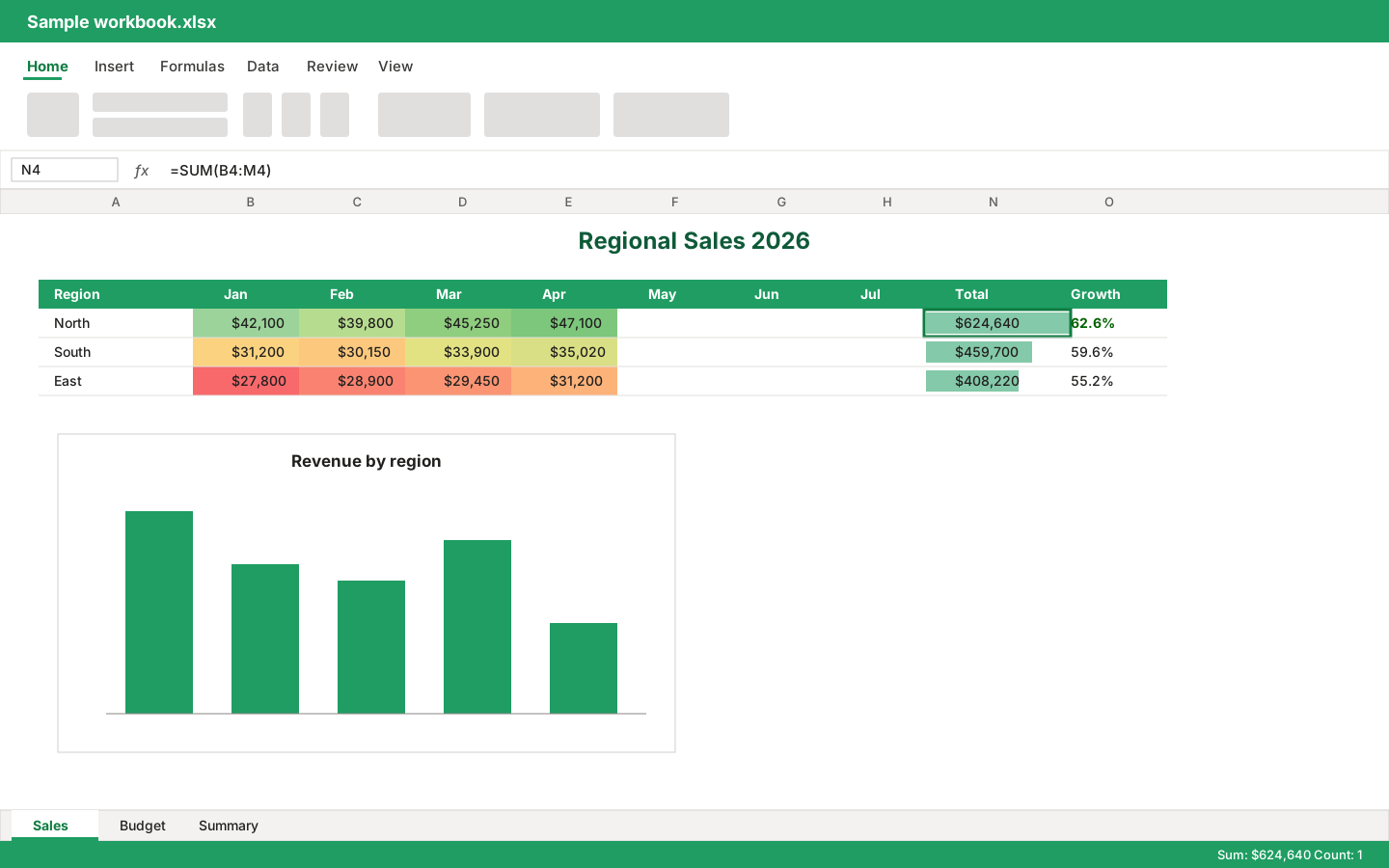
One shared editor
A ribbon, name box, formula bar, grid, sheet tabs and status bar live in one web component, with undo and redo and a read-only mode. Bindings add no UI of their own.
Element API →Early implementation · Apache-2.0 · TypeScript
A browser spreadsheet editor for React, Vue, Angular, Svelte, Solid, and vanilla JavaScript. One workbook model with a formula engine and one <xlsx-editor> web component do the work; the framework adapters only wire up lifecycle and events.
npm install @christophervr/xlsx-react-viewerPublished to npm. Each framework package is self-contained: it bundles the editor and brings the workbook model with it.
Live demo
This is the editor running in your browser: the demo app built from this repository for each framework adapter, embedded live with the sample workbook open.
Features
A ribbon, name box, formula bar, grid, sheet tabs and status bar live in one web component, with undo and redo and a read-only mode. Bindings add no UI of their own.
Element API →A formula engine in ooxml-core parses and evaluates cell formulas, recalculating dependents after each edit. Unknown functions show #NAME? instead of a guessed result.
Features and limitations →Fonts, fills, borders, alignment, number formats, merged cells, frozen panes, column widths and row heights are read from the file and drawn by the grid.
Features and limitations →Colour scales, data bars, icon sets and cell rules are evaluated over live values; drop-down list validations offer their choices in the grid.
Features and limitations →Common chart types are drawn as SVG from live cell values. Chart editing is not offered; the chart parts are written back unchanged.
Features and limitations →Excel 97-2003 workbooks load through the shared ole2 codecs inside ooxml-core and save as .xlsx. CSV opens and exports from the active sheet.
Features and limitations →Parts the model does not cover (VBA projects, pivot caches, custom XML, chart detail) are carried through on save where the sheet still exists.
Architecture →The interface is built for English, French, German, Spanish, and Simplified Chinese through one locale option. Workbook content is never translated.
Localization →Status
This is an early implementation and not Microsoft Excel parity. Pivot tables, slicers, sparklines, macros and external links are preserved but not shown or edited; the function library is large but not complete; password-protected files are unsupported. The features page lists the gaps.
Features and limitations →import { loadWorkbook, saveWorkbook, sheetToCsv } from 'xlsx-vanilla-viewer';
// Any editor package bundles this loader; it detects .xlsx, .xls or CSV from the bytes.
const workbook = await loadWorkbook(bytes, { fileName: 'Budget.xls' });
console.log(workbook.format, workbook.sheets.map((sheet) => sheet.name));
// Saves as .xlsx (a legacy .xls is converted), or one sheet as CSV.
const xlsx = await saveWorkbook(workbook, 'xlsx');
const csv = sheetToCsv(workbook, 0);Getting started
Every adapter mounts the same <xlsx-editor>. Pass a workbook or file bytes, listen for changes, and give the container a height.
import { useState } from 'react';
import { createWorkbook, SpreadsheetEditor } from '@christophervr/xlsx-react-viewer';

export function Editor() {
  const [workbook, setWorkbook] = useState(() => createWorkbook());
  return (
    <SpreadsheetEditor
      workbook={workbook}
      fileName="Budget.xlsx"
      onWorkbookChange={setWorkbook}
    />
  );
}To run the demos or work on the editor itself, clone the repository. Bun is required.
bun install
bun run demoFAQ
Yes. One self-contained editor package per framework is on npm, for example npm install @christophervr/xlsx-react-viewer. Each package is versioned on its own. Release policy →
The repository is Apache-2.0 licensed.
No. The grid draws what the model understands, the formula engine covers a large but incomplete set of functions, and several workbook features are preserved without being shown or edited. Features and limitations →
They are written to open without repair, and the round trip is checked by tests in ooxml-core. That is a design goal, not a claim of lossless export. Architecture →
React, Vue 3, Angular, Svelte 5, SolidJS, and plain JavaScript. They share one editor and model; each adapter only handles mounting, property updates, and event forwarding. Framework bindings →
Not yet. Real-time collaboration is not implemented for spreadsheets. Collaboration →
Yes, read only: values, formulas where they decode, basic formatting, merges and sheet layout load, and the workbook saves as .xlsx.
Unsupported today.
Get started
Read the getting-started guide, pick your framework, and try the demo with a workbook of your own. Apache-2.0 licensed, strict TypeScript, and honest about the gaps.