
Public structure
GitHub Pages hosts a source-only project website: a landing page, PS2-to-PC feature comparison, player guides, developer documentation and the local-file browser launcher.
docs/guides/: player-facing Markdown and developer entry points.docs/site/pages.json: explicit publication list, sidebar order and page descriptions.docs/site/: shared template, landing page, CSS, JavaScript and original vector mark.scripts/buildtool/build_pages.py: Markdown rendering, source-link conversion, search-index generation and local link/fragment validation.runtime/web/pages/: existing browser launcher and service worker sources.build/github-pages/: generated, ignored website output. This is the only directory uploaded by the Pages workflow.
The site uses one pinned build dependency, Python-Markdown. There is no frontend dependency installation, remote font, analytics script or game-data build. Existing BUILDING.md and the portability reference are rendered from their canonical files rather than copied into a second document.
The visual design follows the game's title screen: a dusk-lit gameplay backdrop, gilt frames with corner studs, cream serif menu text and an ember-orange selected row. The palette is informed by runtime/settings/src/Menu.cpp. The mark and stone texture are original SVG source. Display text uses local Castellar with serif fallbacks; body text uses local Goudy Old Style with Palatino/Georgia fallbacks.
Navigation, theme and install flow
The header holds only the GitHub icon, a light/dark toggle and an Install button; all other navigation lives in the docs sidebar (which also carries the search button; / still opens search). The theme is stored in localStorage (drakan-theme), defaults to the OS preference and is applied by an inline script in template.html before first paint. Colours are tokens in site.css: dark is the dusk/gilt look, light is parchment under the leather header.
docs/site/install-flow.html is the Install page (get-started.html): a Windows / Linux / Browser stepper that shows one step at a time through site.js, and lists every step when JavaScript is off.
Step banners are original SVGs in docs/site/assets/art-*.svg, listed in media.json as "kind": "art", and are used only by the Install page. Guides use real captures instead (see below), placed with <!-- media:ID --> under a heading.
Screenshots and animations
Documentation captures are hosted separately as attachments to the site-media-20261028 GitHub release. No captures are committed or copied into the Pages artifact. docs/site/media.json records each screenshot's URL, dimensions, local source, SHA-256 and caption. The README uses the same public URLs. Keep source captures and conversion outputs under ignored build/.
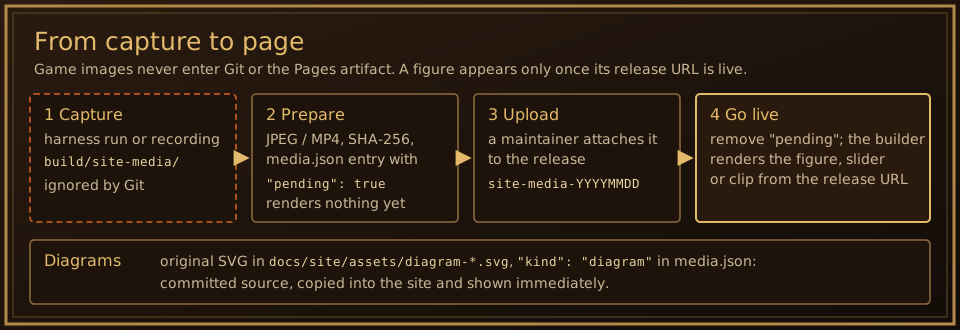
The second batch (HD comparisons, mouse-look and bow clips, hero backdrop) is attached to site-media-20261029. The third (frame-rate, ray-tracing and DLAA comparisons, inventory/strip/map clips) is on site-media-20261030. The fourth (HD movie comparison, browser launcher states and title, quicksave/quickload, Load Game and title screens, Windows PC Settings and FPS counter) is prepared for site-media-20261031 and marked "pending" until it is uploaded; the files, hashes and upload command are listed in the ignored build/site-media/UPLOAD.md. The fifth (site-media-20261101) holds the looping feature clips: kind: "clip" entries render as chips in the home page's "Also new on PC" list that open their MP4 in the media dialog, and an entry with "loop": true (dual wielding) autoplays muted like a GIF with no button. They were recorded with build/site-media/record_steps.py, which posts input to the game window only and stops recording as soon as another window covers the capture area.
Guides use ordinary Markdown image links; the builder expands recognized URLs into captioned figures. The homepage and guides can also use <!-- media:ID --> markers. media.json entries render by kind:
- plain entries: a figure that opens in the image dialog;
animation_urladds a Play animation button that swaps in a GIF. video_url: a muted, looping MP4 with theurlimage as poster.site.jsplays it while it is on screen and offers a Play/Pause button; with reduced motion it only plays on request. Without JavaScript the native controls stay."kind": "compare": the before/after slider. Each scene hasbefore_urlandafter_url;before_label/after_labelname the two sides (default Original / HD). Tabs switch scenes; a transparent range input moves the split, so keyboard and touch work. The stage is 16:9 unlesswidth/heightgive another shape (the 4:3 movie comparison)."kind": "backdrop": the homepage hero image."kind": "diagram": an original SVG diagram indocs/site/assets/diagram-*.svgwithwidth,height,altandcaption. Diagrams are committed source, copied into the site and shown at once; they open in the image dialog like captures.
Create every site-media-* release with --prerelease --latest=false. GitHub's "Latest" release is what
releases/latest/download/DrakanPC-Setup.exe (README, install guide) resolves to; when a media release became Latest
on 30 October 2026 that link returned 404. The release workflow marks each game release Latest again when it publishes.
Every URL in an entry, including scene URLs, must point at a site-media-* release. An entry with "pending": true renders nothing (its marker or Markdown image is removed), so a capture can be prepared, reviewed and placed in a guide before its release upload without leaving a broken image. After uploading, delete the pending field.
Diagrams are for the Development pages, where there is no game screen to show. Player guides use real captures of the game, launcher or builder; a section without a possible capture stays without an image rather than getting a diagram. Diagrams follow the site look with the dark panel, gilt frame and fonts baked into the SVG, so they read the same on the light theme. Draw them from the code and current references, keep them few, and check the layout with the Georgia fallback as well (Castellar and Goudy Old Style are Windows fonts).
Capturing comparison and clip media
Comparisons must show the same frame: run the same harness recipe twice and change only the texture settings. Camera moves are deterministic between runs; walking and animation phase (Arokh's wings, for example) are not, so use still-camera scenes.
python scripts/harness/play_run.py --name site-hd-on --recipe scripts/harness/recipes/site_hd_scene.txt --env DRAKAN_SHOW_FPS=0
python scripts/harness/play_run.py --name site-hd-off --recipe scripts/harness/recipes/site_hd_scene.txt --env DRAKAN_SHOW_FPS=0 --env GSR_TEXREPLACE=0 --env GSR_TEXUP=1
GSR_TEXREPLACE=0 GSR_TEXUP=1 gives the original textures (no replacement and no live upscaling). Other levels use --level 1c etc. with site_hd_level.txt.
For clips, point DRAKAN_INI at a copy of drakan.ini with a 1280×720 windowed mode, show_fps = 0, inventory_screen = native (the bow recipe navigates the original Tab screen) and dual_wield = 0. A 4K window drops shot requests when they come every sample. site_mouse_look.txt needs world_rate = 30 (one shot per sample = 30 FPS video). site_bow.txt needs world_rate = uncapped and starts from the bow fixture card (--save with a Surdana save next to the bow table). Script events must be in frame order. The mouse/LMB overlay is drawn afterwards from the recipe's own input, and the frames are encoded with FFmpeg (H.264, yuv420p, +faststart).
Ray tracing and DLAA use the save fixtures from the water/shadow work (build/harness/aoline-fixture-open-pond, -coast-bank) and site_still.txt, with DRAKAN_INI copies that differ only in modern_water / ray_reflections / ray_shadows or dlss = off / dlaa. Only the first shot of the river fixture matches between runs: with ray tracing on, loading takes longer and Rynn slides into the water before the later shots. DLAA barely shows at internal scale 3, so its comparison uses scale = 1.
Clips that must show real motion or frame rate (the 30 / uncapped comparison, the inventory, strip and map tours) are recorded live with scripts/harness/record_window.py and the site_rec_*.txt recipes, which use clock milliseconds so both frame rates get the same input over the same time. Recording costs frame rate (uncapped ran at about 85–130 FPS while recording), and the video itself is 60 FPS, so the frame-rate clip enlarges the game's own counter instead of claiming the video shows the difference. The scripted cursor x y is in the game's 640×512 GUI space.
Renderer shots do not include the PC overlay (F1 settings, FPS counter, quicksave card). Capture those with DRAKAN_OVERLAY_SHOT_DIR=<dir>: writing a name to <dir>/shot.txt makes the runtime save the presented frame with the overlay as <dir>/<name>.bmp, without screen capture or focus. Overlay hotkeys such as F1 are read from window messages, so post WM_KEYDOWN to the DrakanWindow rather than using the recipe's key tap. Avoid gdigrab captures of the desktop when other windows may cover the game. Run harness captures from a copy of the play folder (play_run.py --exe) so a concurrent build can still replace dist/DrakanPC.
Movie comparisons pair an IPU frame decoded from the ISO without filters (fmv_hd_pack.py's load_movies / decode_chunk) with the same frame index of the generated pack (<key>.mkv, frame i = movie frame i), both scaled to 4:3. Launcher screenshots use Playwright with the installed Chrome against the local preview; error states are reproduced through the launcher's own checks (an empty folder, or the folder-access API removed).
Captions are short and say what the capture shows. Full movie packs, subtitle transcripts and playable game files are not distributed with the site. New media requires deliberate review and upload; the site build never uploads or generates it automatically.
Build and preview
From the repository root, use Python 3.11 or newer:
python -m pip install -r docs/site/requirements.txt
python scripts/buildtool/build_pages.py
python -m http.server 8765 --bind 127.0.0.1 --directory build/github-pages
Open http://127.0.0.1:8765/. This previews documentation and the launcher UI; actually playing still requires a private browser build and ISO. Shut down the server with Ctrl+C when finished.
The default published base path is /Drakan2PC/. Normal pages use relative links and can be served from a repository subpath or a local root. Set --base-path / when testing the 404 page at a local root, or supply another repository path when deploying elsewhere. The custom 404 uses absolute base-path links so it also works for deeply nested unknown URLs.
Add or update a page
- Edit the canonical Markdown file. New player guides go under
docs/guides/. - Add new published pages to
docs/site/pages.json, with a unique URL, title, section and description. - Use ordinary Markdown source-relative links. Published sources become site links; other existing repository files become GitHub links.
- Build the site. Missing source links, broken generated links/fragments, duplicate IDs and unexpected artifact suffixes fail the build.
- Preview desktop and narrow layouts, and check search and navigation after changing the site UI.
The builder only publishes listed Markdown, explicit template/assets and four allowlisted launcher files. It does not recursively copy the repository, dist, a game build, journals or private assets. Review additions to the allowlist accordingly. Site output must be a dedicated folder under build/.
Browser-player compatibility
The launcher UI lives at browser.html, while loader.js, handles.js and sw.js retain their original root-relative locations. The virtual game path stays play/, the service-worker scope stays the site root and the IndexedDB names stay unchanged. Existing root bookmarks open the new homepage, whose navigation links to Browser player.
Do not move play/, change database names or instruct players to clear site storage as part of a site redesign. The worker intercepts only play/, leaving documentation requests to the network. It continues to read the player's chosen files locally. The legacy standalone launcher source in runtime/web/pages/index.html is also retained.
Deployment
.github/workflows/pages.yml builds and validates the site on relevant pushes and pull requests. The deploy job runs only for pushes or manual dispatches in the public ChristopherVR/Drakan2PC repository, preventing a development-repository push or pull request from publishing accidentally. Use GitHub Pages' GitHub Actions publishing source in repository settings.
The workflow retains pinned checkout and Pages actions and uploads build/github-pages. Drakan2PC is the only repository. On 2026-10-30 the private Drakan2PC-dev was folded into it as one squashed commit (its history stays private in the archived Drakan2PC-dev, because older commits held material the guard now rejects); a documentation change deploys when it reaches main. Local edits and previews do not publish anything.
The build and deploy jobs are separate so a failed renderer or link check blocks publication. Consult the Pages workflow run and deployment URL for evidence of publication.
Checks
python -m unittest discover -s scripts/tests -p test_build_pages.py
python scripts/buildtool/build_pages.py
python scripts/repository_guard.py
Site tests skip when the optional Markdown dependency is absent from a general developer environment. The Pages workflow installs it and runs the tests before building. The tests protect repository-subpath URLs, 404 links, local-link failure behavior and preservation of browser-player assets.