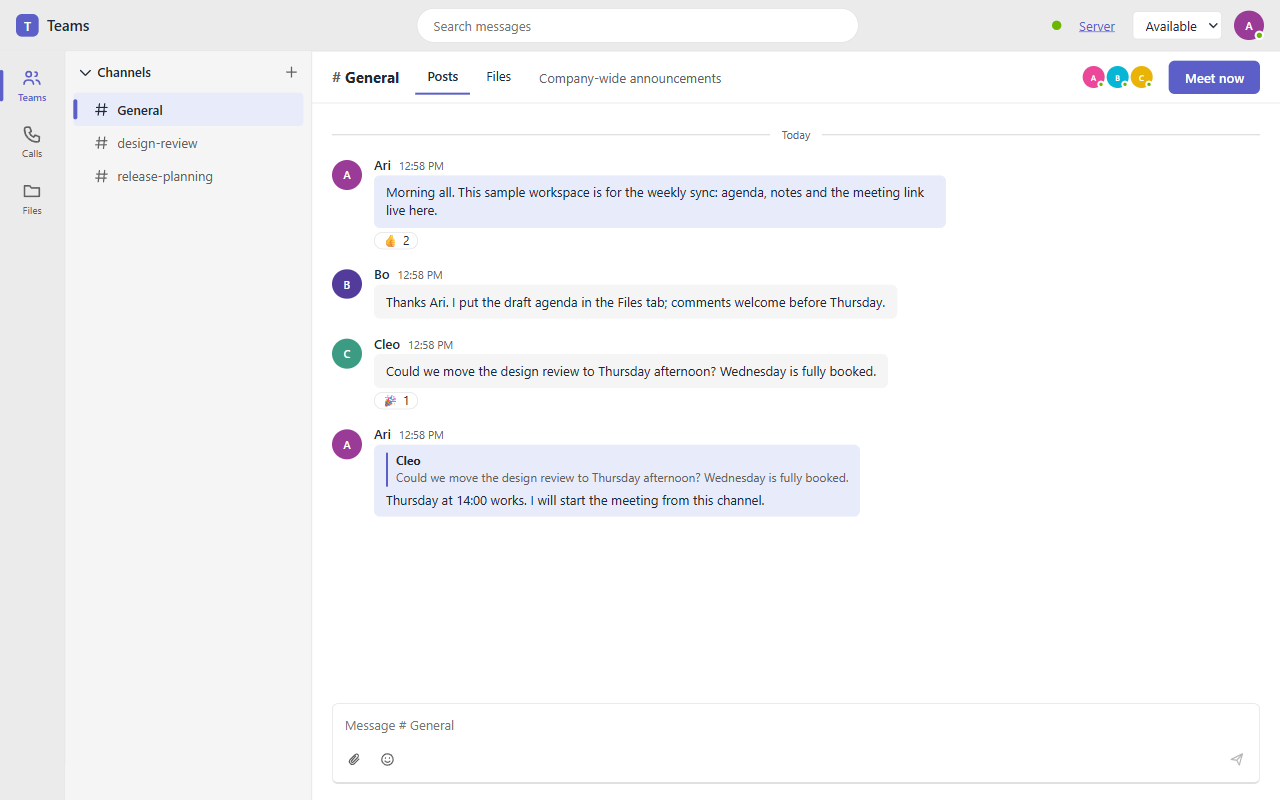
Vanilla: the whole app
One <teams-app> element: channels, posts with replies and reactions, files, search, presence and meetings. Open it in two tabs to see two people talk.
Open the demo →Open source · bring your own server
OpenTeams is a team workspace for the web: channels and chat, presence, WebRTC meetings and Office files shared in the conversation. One web component, thin bindings for six frameworks, and a small reference server. An early implementation: not Microsoft Teams, and no end-to-end encryption.
npm install openteams-react-viewer
npx openteams-serverLive demo
This is the real app running in your browser, with no server behind it: chat, presence and calls travel only between frames and tabs of this browser (BroadcastChannel). Switch to two people to put Ada and Bob in one room, each in the framework you choose (for example React for Ada and Vue for Bob), and watch a message cross from one pane to the other. Real use needs a server; see bring your own server.
Demo apps
One <teams-app> element: channels, posts with replies and reactions, files, search, presence and meetings. Open it in two tabs to see two people talk.
Open the demo →The <Teams /> component on the left and a hand-written panel over the useTeams() hook on the right, both on one workspace.
Open the demo →What it does
Channels, posts with replies, reactions, author-only edit and delete, search and unread counts, all in one Yjs document that merges concurrent edits.
Getting started →Who is online, typing indicators and an availability you set yourself (available, busy, away). Presence is advisory, like any Yjs awareness.
Architecture →Audio, video, screen share and raise hand in a full-mesh call: no media server, honest up to about a dozen people. TURN is yours to run.
Calls and TURN →Attachments are uploaded to your server (or your own uploader) and posted as links. Word, Excel, PowerPoint and Visio files are recognised so a host can open them.
File storage →Three small contracts: y-websocket sync, a JSON signaling relay and optional file storage. openteams-server does all three in one Node process.
Server guide →React, Vue, Angular, Svelte, Solid and vanilla bindings. Each gives you the full component and a raw hook over the same client store.
Framework guides →Honest limits
Quickstart
Install the binding for your framework and render the component. Local mode needs no server; for real use point config at your own sync and signaling endpoints (the reference server does both). Angular, Svelte and Solid have the same options.
npm install openteams-react-viewer reactimport { Teams } from 'openteams-react-viewer';
export function App() {
return (
<Teams
workspaceId="acme"
userName="Ada"
config={{ mode: 'local', iceServers: [] }}
/>
);
}FAQ
The repository is Apache-2.0 licensed. The packages are published to npm as openteams-*-viewer and openteams-server.
Real use does: you bring your own server for sync (y-websocket), signaling and optional file storage. The reference server, openteams-server, does all three in one Node process. Without a server the demos run in a local mode that only connects tabs of one browser.
Bring your own server →No. Chat travels as Yjs updates through your server, which can read and store it. Call media is DTLS-SRTP between peers.
Limitations →No. OpenTeams is not Microsoft Teams, is not affiliated with Microsoft and claims no feature parity. It has channels, posts with replies, reactions, files, search, presence and meetings with screen share.
Calls are a full mesh with no media server, so they suit a handful of people (default cap 12), not a webinar. TURN is yours to run.
Calls and TURN →React, Vue 3, Angular, Svelte 5, SolidJS and plain JavaScript. They share one <teams-app> element and one core client; each binding also exposes a raw hook so you can build your own UI.
Framework guides →Files are shared as links. Office files are recognised by name so a host application can open them in the matching viewer; OpenTeams does not edit them itself.
Get started
Install a binding, start the reference server with npx openteams-server, and try the demo with two tabs. Apache-2.0 licensed, strict TypeScript, and honest about the gaps.
© 2026 ChristopherVR · Apache-2.0OpenTeams · not Microsoft Teams, not affiliated with Microsoft