React Viewer Overview
pptx-react-viewer is a React 18 or 19 component for rendering and editing .pptx files. It is built on pptx-viewer-core and includes the toolbar, inspector panels, slide canvas, animation engine, presentation mode, real-time collaboration, and export.
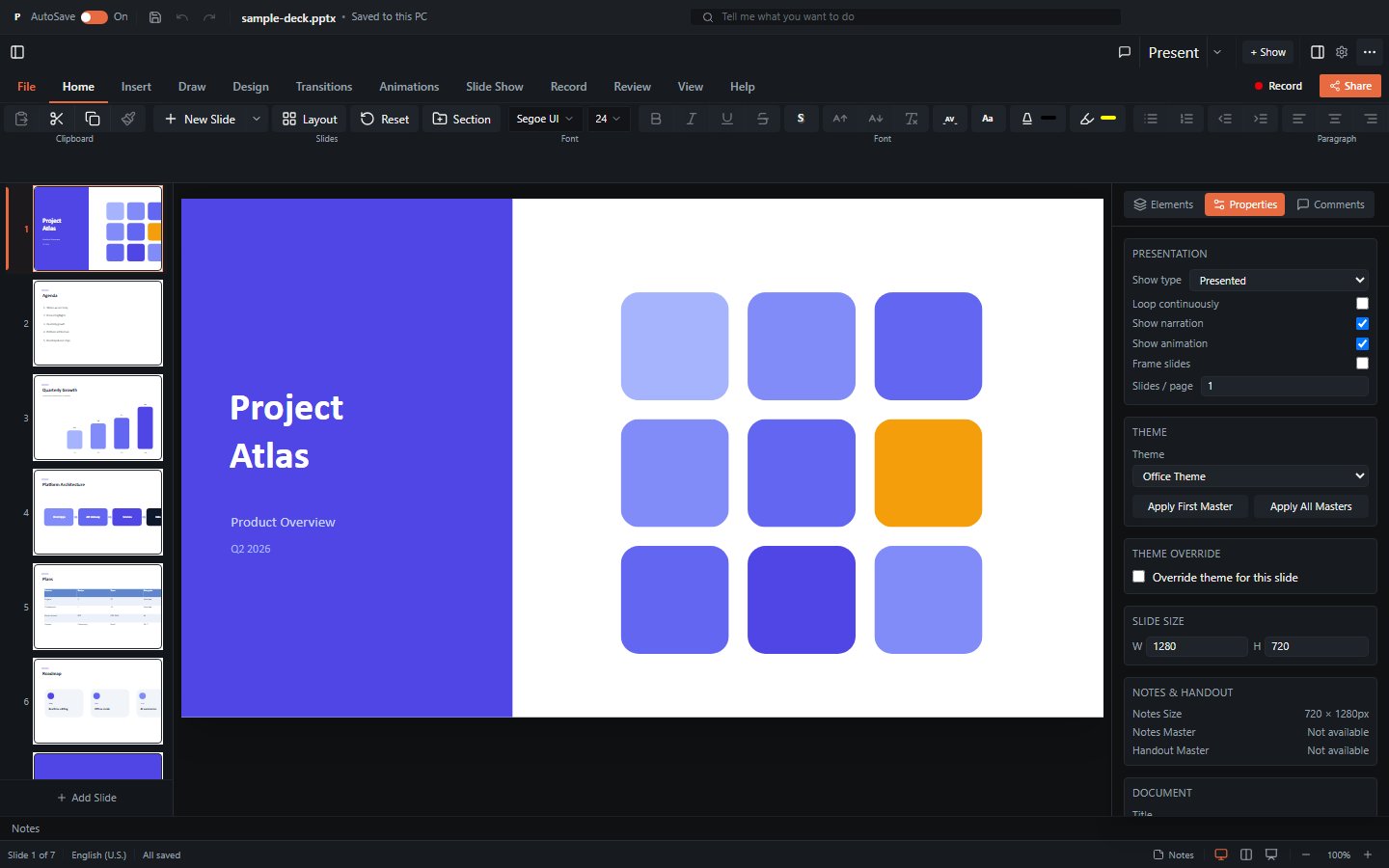
What it provides
| Capability | Summary |
|---|---|
| Viewer | Renders slides with 16 element types (shapes, text, images, tables, 23 chart types, SmartArt, connectors, media, ink, OLE, 3D models, zoom). |
| WYSIWYG editor | Insert / move / resize / delete elements, inline text editing, style editing, slide management - gated behind canEdit. |
| Presenter | Fullscreen slideshow with 39 animation presets and 26 motion paths, 57 transitions (including morph), speaker notes, presenter view with timer. |
| Export | PNG / SVG / PDF / GIF / video / JSON slide export, plus save-as PPTX. See Export. |
| Collaboration | Real-time multi-user editing via Yjs CRDT with presence tracking, remote cursors, and avatars. See Collaboration. |
Element coverage
For a precise list of what the underlying parser/serializer supports - and what is approximated - see Limitations.
Installation
npm i pptx-react-viewerThe core engine (pptx-viewer-core) is bundled in, so you don't install it separately; add it only if you also want to use the framework-agnostic engine directly.
Peer dependencies (you provide these in your app):
reactandreact-dom^18.2 or ^19 (both majors are covered by their own CI test run)framer-motion,lucide-react,react-iconsjspdf,jszip,fast-xml-parseri18next,react-i18next
Optional dependencies (only needed for specific features):
three- GLB/GLTF 3D models plus opt-in 3D SmartArt and 3D chart renderersyjs,y-websocket- real-time collaboration (relay transport)y-webrtc- serverless peer-to-peer collaboration
TIP
3D and collaboration features degrade gracefully. Without three, 3D models fall back to their poster image. Without yjs/y-websocket, the viewer runs in single-user mode.
Import paths
The package exposes these entry points (from package.json exports):
// Root entry - viewer, theme utilities, renderToCanvas
import { PowerPointViewer } from 'pptx-react-viewer';
// AI assistant entry - the recommended value for the `ai` prop
import { createAiAssistant } from 'pptx-react-viewer/ai';
// Viewer sub-entry - same component PLUS the opt-in hooks/components surface
import { PowerPointViewer } from 'pptx-react-viewer/viewer';| Entry | What it exports |
|---|---|
pptx-react-viewer | PowerPointViewer, theme utilities, renderToCanvas and the public types. |
pptx-react-viewer/no-i18next | The root entry's exports, never importing i18next or react-i18next (Without react-i18next). |
pptx-react-viewer/viewer | The same component plus the opt-in hooks and collaboration components (Hooks). |
pptx-react-viewer/ai | createAiAssistant, the PptxAiAssistant handle type and the PptxAi* config types: the recommended way to pass ai (The /ai entry). |
pptx-react-viewer/i18n | The English dictionary, keyToLabel and the locale catalogue (Localization). |
pptx-react-viewer/i18n/fr, /i18n/es, /i18n/de, /i18n/zh-CN, /i18n/ja, /i18n/ko | The bundled locale dictionaries (translationsFr and so on). |
pptx-react-viewer/internals | The internal hooks PowerPointViewer composes. Not covered by semver. |
pptx-react-viewer/styles (or /styles.css) | The bundled stylesheet. |
pptx-react-viewer/canvas.css | A smaller stylesheet for a read-only SlideCanvas (Getting Started). |
pptx-react-viewer/theme.css | The Tailwind CSS v4 @theme tokens, for a host that builds the viewer's utilities into its own stylesheet. |
Both . and ./viewer export PowerPointViewer. The pptx-react-viewer/viewer entry additionally exposes the opt-in, tree-shakeable hooks and collaboration components (see Hooks). Use the root entry for the common case.
Rendering philosophy: CSS, not Canvas
Slides are rendered with CSS positioning and transforms (scaled HTML/SVG), not an HTML Canvas. This provides:
- Crisp text at any zoom level
- Native browser text selection and accessibility
- DOM-based interaction (click, drag, resize hit-testing)
- Standard CSS effects (shadows, gradients, borders)
The tradeoff is that some visual effects are approximated (backdrop-filter, mix-blend-mode, CSS 3D, path gradients). Raster export goes through html2canvas, which has its own constraints. The full list lives in Limitations.
Hooks-based architecture
The component is a forwardRef orchestrator. Its logic is decomposed into 80+ custom hooks composed inside PowerPointViewer.tsx; the visual components are almost purely presentational. Most hooks are internal architecture, but a curated, tree-shakeable subset is exported from pptx-react-viewer/viewer for advanced integrations. See Hooks for which are public API.
Key exports
| Export | Kind | Purpose |
|---|---|---|
PowerPointViewer | component | The main viewer/editor component. |
PowerPointViewerProps | type | Props interface. See Props. |
PowerPointViewerHandle | type | Imperative ref API. See Handle. |
renderToCanvas | function | Render a DOM element to a Canvas with an oklch-colour workaround. See Export. |
getAnimationInitialStyle | function | Compute the pre-animation initial CSS for an animation preset. |
ViewerTheme, ViewerThemeColors | type | Theme configuration types. See Theming. |
defaultThemeColors, defaultRadius | const | Built-in dark-theme defaults. |
themeToCssVars, defaultCssVars | function | Convert a theme to --pptx-* CSS vars. |
ViewerThemeProvider, useViewerTheme | provider/hook | Advanced theme context. |
Toolbar, SlideCanvas, SlidesPane | component | The flat toolbar, canvas and slide thumbnail rail that PowerPointViewer renders internally, for custom layouts. See Hooks. |
useViewerBuildingBlocks | hook | Wires the document, selection and export state into Toolbar, SlideCanvas and SlidesPane props. See Hooks. |
Next steps
- Getting Started - a minimal working example.
- Component Props - the complete
PowerPointViewerPropsreference. - Imperative Handle - the ref API.
- Theming - colours, radius, CSS vars, providers.
- Hooks - architecture and the public hook surface.
- Export - PNG/PDF/SVG/GIF/video and the html2canvas pipeline.
- Collaboration - Yjs co-editing and presence.