PptxData 数据模型
handler.load() 返回一个 PptxData 对象,表示完整解析后保存在内存中的演示文稿。编辑时修改这个对象,保存时再将其序列化为 .pptx 归档。
PptxData
这是顶层数据模型。下面列出常用字段,接口还包含用于保留原始文件信息的大量元数据。
interface PptxData {
	slides: PptxSlide[]; // the slides, in order
	width: number; // presentation width in pixels (approx)
	height: number; // presentation height in pixels (approx)
	widthEmu?: number; // slide width in EMU (round-trip)
	heightEmu?: number; // slide height in EMU (round-trip)
	slideSizeType?: string; // e.g. "screen4x3", "screen16x9", "custom"

	theme?: PptxTheme; // full parsed theme (colours, fonts, name)
	themeColorMap?: Record<string, string>; // colour scheme key → hex
	slideMasters?: PptxSlideMaster[]; // masters (each with its layouts)

	sections?: PptxSection[]; // ordered presentation sections
	customShows?: PptxCustomShow[]; // named custom slide shows
	embeddedFonts?: PptxEmbeddedFont[];

	// document metadata
	coreProperties?: PptxCoreProperties; // docProps/core.xml
	appProperties?: PptxAppProperties; // docProps/app.xml
	customProperties?: PptxCustomProperty[]; // docProps/custom.xml

	// flags
	isPasswordProtected?: boolean;
	hasMacros?: boolean; // is a .pptm
	hasDigitalSignatures?: boolean;
	conformance?: 'strict' | 'transitional'; // original OOXML conformance class

	warnings?: PptxCompatibilityWarning[]; // unsupported-feature notices
}
像素与 EMU
width 和 height 是便于布局计算的近似像素值;widthEmu 和 heightEmu 保留原始精确值,用于往返保存。详见下文的单位说明。
PptxSlide
data.slides 中的每一项表示一张幻灯片,elements 数组保存其中的内容。
interface PptxSlide {
	id: string;
	rId: string; // relationship ID
	slideNumber: number;
	name?: string; // optional author-supplied name
	layoutPath?: string; // the layout this slide is based on
	layoutName?: string;
	hidden?: boolean; // hidden slides are skipped in presentation mode
	sectionName?: string;
	sectionId?: string;
	elements: PptxElement[]; // the slide's content
	backgroundColor?: string;
	backgroundImage?: string; // base64 data URL
	backgroundGradient?: string; // CSS gradient string
	backgroundPattern?: PptxSlideBackgroundPattern;
	transition?: PptxSlideTransition;
	animations?: PptxElementAnimation[];
}幻灯片未显式指定的样式通过版式和母版解析,详见幻灯片、版式和母版。
元素基类与组合接口
所有元素类型均继承 PptxElementBase,该接口定义于 packages/core/src/core/types/element-base.ts,包含标识、几何属性和往返保存所需的数据:
interface PptxElementBase {
	id: string; // synthetic positional id assigned by the loader
	shapeId?: string; // native OOXML id from p:cNvPr/@id (animation target key)
	name?: string; // cNvPr/@name (used for morph "!!" matching)

	x: number; // pixels, converted from EMU at parse time
	y: number;
	width: number;
	height: number;
	rotation?: number; // degrees
	skewX?: number; // degrees
	skewY?: number;
	flipHorizontal?: boolean;
	flipVertical?: boolean;

	hidden?: boolean;
	opacity?: number; // 0-1
	locks?: PptxShapeLocks; // p:cNvSpPr/a:spLocks
	actionClick?: PptxAction; // a:hlinkClick on p:cNvPr
	actionHover?: PptxAction; // a:hlinkHover on p:cNvPr

	rawXml?: XmlObject; // preserved source XML
	extLstXml?: XmlObject[]; // unrecognised <a:ext> extensions, kept verbatim
}
另外两个组合接口补充相应能力。包含文本的元素使用 PptxTextProperties,提供 text、textStyle、富文本 textSegments、promptText 和文本框链接;形状、连接线和图片使用 PptxShapeProperties,提供 shapeType、shapeStyle、shapeAdjustments 和 adjustmentHandles。例如:
interface TextPptxElement extends PptxElementBase, PptxTextProperties, PptxShapeProperties {
	type: 'text';
}

interface ImagePptxElement
	extends PptxElementBase, PptxShapeProperties, PptxCustomPathProperties, PptxImageProperties {
	type: 'image';
}
往返保存字段
rawXml 和 extLstXml 用于保留类型化模型尚未理解的标记,并在保存时重新输出。如果后续需要保存文件,请勿删除这些字段。
PptxElement 联合类型
slide.elements 是由 PptxElement 可辨识联合类型组成的数组,共 16 种类型,定义于 packages/core/src/core/types/elements.ts。通过 type 字段缩小类型范围后,再访问该类型特有的属性。
type 字符串 | 接口 | 说明 |
|---|---|---|
"text" | TextPptxElement | 文本框,通常为没有可见填充和边框的矩形文本区域。 |
"shape" | ShapePptxElement | 使用预设或自由几何的形状,也可以包含文本。 |
"connector" | ConnectorPptxElement | 连接形状的直线、折线或曲线,可以带箭头。 |
"image" | ImagePptxElement | 来自 <p:pic> 节点的位图。 |
"picture" | PicturePptxElement | 功能与 image 相同,通过不同的辨识值明确语义。 |
"table" | TablePptxElement | 通过 <p:graphicFrame> 嵌入的表格,单元格保存在 tableData 中。 |
"chart" | ChartPptxElement | 通过 <p:graphicFrame> 嵌入的图表,数据保存在 chartData 中。 |
"smartArt" | SmartArtPptxElement | 分解为已定位形状的 SmartArt 图示,数据保存在 smartArtData 中。 |
"ole" | OlePptxElement | 带预览图片的 OLE 对象,可嵌入 Excel、Word、PDF、Visio 或 MathType 内容。 |
"media" | MediaPptxElement | 引用归档中文件的音频或视频元素。 |
"group" | GroupPptxElement | 组合容器,其 children 继承组合的变换。 |
"ink" | InkPptxElement | 以 SVG 路径保存的触控笔或鼠标自由绘制笔画,可包含压力信息。 |
"contentPart" | ContentPartPptxElement | mc:AlternateContent 内容部件,通常用于新版画笔或荧光笔墨迹。 |
"zoom" | ZoomPptxElement | 跳转到目标幻灯片的幻灯片缩放定位或节缩放定位对象。 |
"model3d" | Model3DPptxElement | 通过 p16:model3D 嵌入的三维模型(.glb/.gltf),带预览图片。 |
"unknown" | UnknownPptxElement | 解析器无法识别的元素,为往返保存而保留。 |
图形框架类型(table、chart、smartArt)还包含 extensionXml 数组,原样保留无法识别的 a:graphicData/a:extLst 扩展。
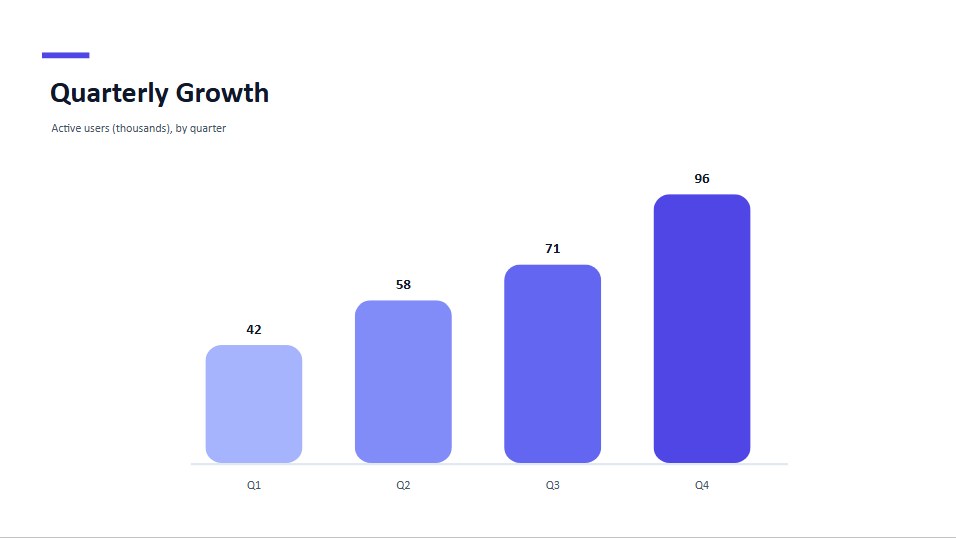
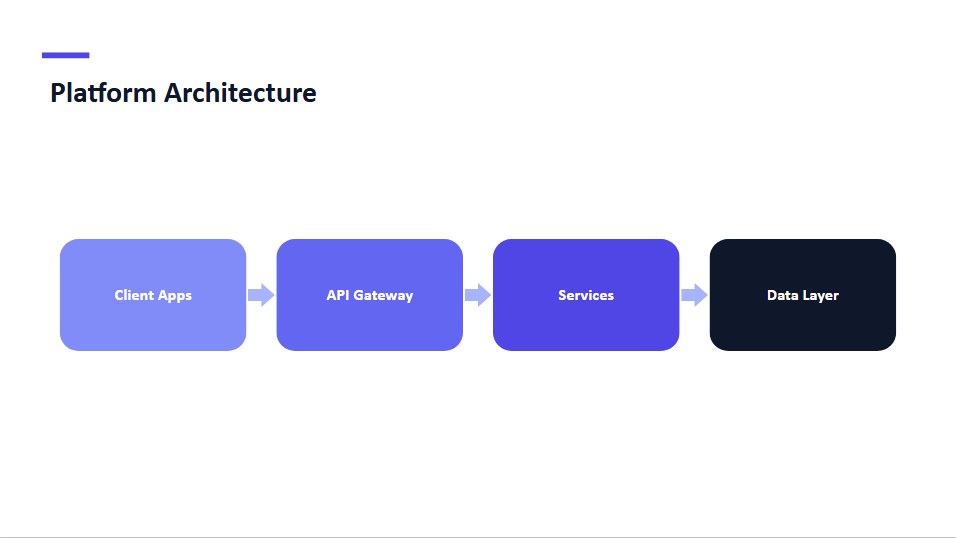
下面展示其中几类元素的渲染结果:图表使用内联 SVG,表格使用 HTML,形状和连接线使用 SVG 几何。

子集类型别名
对于只接收部分元素类型的函数,核心包导出以下辅助别名:
type PptxElementWithText = TextPptxElement | ShapePptxElement | ConnectorPptxElement;
type PptxImageLikeElement = ImagePptxElement | PicturePptxElement;
// plus PptxElementWithShapeStyle for everything carrying shapeStyle
类型守卫
packages/core/src/core/types/type-guards.ts 导出运行时类型守卫,无需手动编写 element.type === ... 判断:
| 守卫 | 缩小后的类型 |
|---|---|
isTextElement(el) | TextPptxElement |
isShapeElement(el) | ShapePptxElement |
isConnectorElement(el) | ConnectorPptxElement |
isImageLikeElement(el) | PptxImageLikeElement(image 或 picture) |
isInkElement(el) | InkPptxElement |
isZoomElement(el) | ZoomPptxElement |
hasTextProperties(el) | PptxElementWithText(可包含文本) |
hasShapeProperties(el) | PptxElementWithShapeStyle(可包含形状样式) |
import { isImageLikeElement, hasTextProperties } from 'pptx-viewer-core';

for (const el of slide.elements) {
	if (isImageLikeElement(el)) console.log(el.imagePath);
	if (hasTextProperties(el)) console.log(el.text);
}
单位:EMU 与像素
PowerPoint 的原生坐标单位为 English Metric Unit(EMU):
| 常量 | 值 | 位置 |
|---|---|---|
EMU_PER_PX / EMU_PER_PIXEL | 9525(96 DPI) | core/constants.ts 和 SDK 的 units 模块 |
EMU_PER_INCH | 914400 | SDK 的 units 模块 |
EMU_PER_POINT | 12700 | SDK 的 units 模块 |
模型中元素的位置和尺寸使用像素,在解析时由 EMU 换算并取整,保存时再换算回去。构建器 SDK 还导出以下换算函数:
import {
	inches,
	cm,
	mm,
	pt, // to pixels
	emuToPixels,
	pixelsToEmu, // EMU <-> px
	inchesToEmu,
	cmToEmu, // to EMU (e.g. for slide dimensions)
	SlideSizes,
} from 'pptx-viewer-core';

inches(1); // => 96 (px)
pt(12); // => 16 (px)
pixelsToEmu(96); // => 914400
SlideSizes.WIDESCREEN_16_9; // => { width: 12192000, height: 6858000 } (EMU)
SlideSizes 提供以 EMU 表示的标准演示文稿尺寸:WIDESCREEN_16_9(现代默认比例)、STANDARD_4_3、WIDESCREEN_16_10、A4_LANDSCAPE、A4_PORTRAIT、LETTER_LANDSCAPE 和 LETTER_PORTRAIT。
幻灯片、版式和母版
演示文稿的样式具有层级关系。每张幻灯片通过 slide.layoutPath 引用一个版式,每个版式属于一个母版,每个母版再引用一个主题:
PptxSlide ── layoutPath ──> PptxSlideLayout ──> PptxSlideMaster ── themePath ──> PptxThemedata.slideMasters 提供这棵树:
interface PptxSlideMaster {
	path: string; // e.g. "ppt/slideMasters/slideMaster1.xml"
	name?: string;
	themePath?: string; // theme this master references
	layoutPaths?: string[]; // layouts belonging to this master
	layouts?: PptxSlideLayout[]; // parsed layout objects
	elements?: PptxElement[]; // shapes drawn on the master itself
	placeholders?: Array<{ type: string; idx?: string }>;
	txStyles?: PptxMasterTextStyles; // title/body/other text defaults
	clrMap?: Record<string, string>; // scheme-colour alias map (bg1, tx1, ...)
	backgroundColor?: string;
	backgroundImage?: string;
}

interface PptxSlideLayout {
	path: string;
	name?: string;
	elements?: PptxElement[];
	placeholders?: Array<{ type: string; idx?: string }>;
	clrMapOverride?: Record<string, string>; // p:clrMapOvr
	backgroundColor?: string;
	backgroundImage?: string;
}当幻灯片元素没有指定某个属性时,引擎会沿继承链查找:元素本身、版式中匹配的占位符、母版,最后是主题。PptxData 上的 themeColorMap 是默认母版已经解析好的方案颜色映射。具体规则见架构说明。
遍历与类型缩小
import { PptxHandler } from 'pptx-viewer-core';
import type { PptxElement } from 'pptx-viewer-core';

const handler = new PptxHandler();
const data = await handler.load(buffer);

function summarize(elements: PptxElement[]) {
	for (const element of elements) {
		switch (element.type) {
			case 'text':
				console.log('text:', element.text);
				break;
			case 'image':
			case 'picture':
				console.log('image:', element.imagePath);
				break;
			case 'table':
				console.log('table rows:', element.tableData?.rows.length ?? 0);
				break;
			case 'chart':
				console.log('chart:', element.chartData?.chartType);
				break;
			case 'group':
				summarize(element.children); // recurse into the group
				break;
			default:
				console.log('element:', element.type);
		}
	}
}

for (const slide of data.slides) {
	summarize(slide.elements);
}
相关阅读
- 架构说明:引擎结构和主题解析方式。
- 核心引擎概览:处理器、构建器和转换器 API。
- OpenXML 支持情况:Strict 与 Transitional 格式的往返保存。