The PptxData Model
handler.load() returns a single PptxData object: the fully parsed, in-memory representation of a presentation. Editing means mutating this object; saving serializes it back to a .pptx archive.
PptxData
The top-level model. The most-used fields are listed here; the interface also carries extensive metadata for lossless round-trip.
interface PptxData {
	slides: PptxSlide[]; // the slides, in order
	width: number; // presentation width in pixels (approx)
	height: number; // presentation height in pixels (approx)
	widthEmu?: number; // slide width in EMU (round-trip)
	heightEmu?: number; // slide height in EMU (round-trip)
	slideSizeType?: string; // e.g. "screen4x3", "screen16x9", "custom"

	theme?: PptxTheme; // full parsed theme (colours, fonts, name)
	themeColorMap?: Record<string, string>; // colour scheme key → hex
	slideMasters?: PptxSlideMaster[]; // masters (each with its layouts)

	sections?: PptxSection[]; // ordered presentation sections
	customShows?: PptxCustomShow[]; // named custom slide shows
	embeddedFonts?: PptxEmbeddedFont[];

	// document metadata
	coreProperties?: PptxCoreProperties; // docProps/core.xml
	appProperties?: PptxAppProperties; // docProps/app.xml
	customProperties?: PptxCustomProperty[]; // docProps/custom.xml

	// flags
	isPasswordProtected?: boolean;
	hasMacros?: boolean; // is a .pptm
	hasDigitalSignatures?: boolean;
	conformance?: 'strict' | 'transitional'; // original OOXML conformance class

	warnings?: PptxCompatibilityWarning[]; // unsupported-feature notices
}
Pixels vs EMU
width / height are approximate pixels for convenient layout math; widthEmu / heightEmu preserve the exact source values for round-trip. See Units below.
PptxSlide
Each entry in data.slides. The elements array holds the authored content.
interface PptxSlide {
	id: string;
	rId: string; // relationship ID
	slideNumber: number;
	name?: string; // optional author-supplied name
	layoutPath?: string; // the layout this slide is based on
	layoutName?: string;
	hidden?: boolean; // hidden slides are skipped in presentation mode
	sectionName?: string;
	sectionId?: string;
	elements: PptxElement[]; // the slide's content
	backgroundColor?: string;
	backgroundImage?: string; // base64 data URL
	backgroundGradient?: string; // CSS gradient string
	backgroundPattern?: PptxSlideBackgroundPattern;
	transition?: PptxSlideTransition;
	animations?: PptxElementAnimation[];
}
A slide resolves its unspecified styling through its layout and master - see Slides, layouts, and masters below.
The element base and mixins
Every element variant extends PptxElementBase (defined in packages/core/src/core/types/element-base.ts), which carries identity, geometry, and round-trip data:
interface PptxElementBase {
	id: string; // synthetic positional id assigned by the loader
	shapeId?: string; // native OOXML id from p:cNvPr/@id (animation target key)
	name?: string; // cNvPr/@name (used for morph "!!" matching)

	x: number; // pixels, converted from EMU at parse time
	y: number;
	width: number;
	height: number;
	rotation?: number; // degrees
	skewX?: number; // degrees
	skewY?: number;
	flipHorizontal?: boolean;
	flipVertical?: boolean;

	hidden?: boolean;
	opacity?: number; // 0-1
	locks?: PptxShapeLocks; // p:cNvSpPr/a:spLocks
	actionClick?: PptxAction; // a:hlinkClick on p:cNvPr
	actionHover?: PptxAction; // a:hlinkHover on p:cNvPr

	rawXml?: XmlObject; // preserved source XML
	extLstXml?: XmlObject[]; // unrecognised <a:ext> extensions, kept verbatim
}
Two mixin interfaces layer on capability. Text-bearing elements add PptxTextProperties (text, textStyle, rich textSegments, promptText, linked-text-box chaining); shapes, connectors, and images add PptxShapeProperties (shapeType, shapeStyle, shapeAdjustments, adjustmentHandles). For example:
interface TextPptxElement extends PptxElementBase, PptxTextProperties, PptxShapeProperties {
	type: 'text';
}

interface ImagePptxElement
	extends PptxElementBase, PptxShapeProperties, PptxCustomPathProperties, PptxImageProperties {
	type: 'image';
}
Round-trip fields
rawXml and extLstXml are how the model stays lossless: markup the typed model does not (yet) understand is preserved on the element and re-emitted on save. Do not strip these fields if you intend to save.
The PptxElement union
slide.elements is an array of the PptxElement discriminated union: 16 variants, defined in packages/core/src/core/types/elements.ts. Narrow on the type field to access variant-specific properties.
type string | Interface | Description |
|---|---|---|
"text" | TextPptxElement | A text box - a rectangle containing text, usually with no visible fill or stroke. |
"shape" | ShapePptxElement | A shape with preset or freeform geometry; may also contain text. |
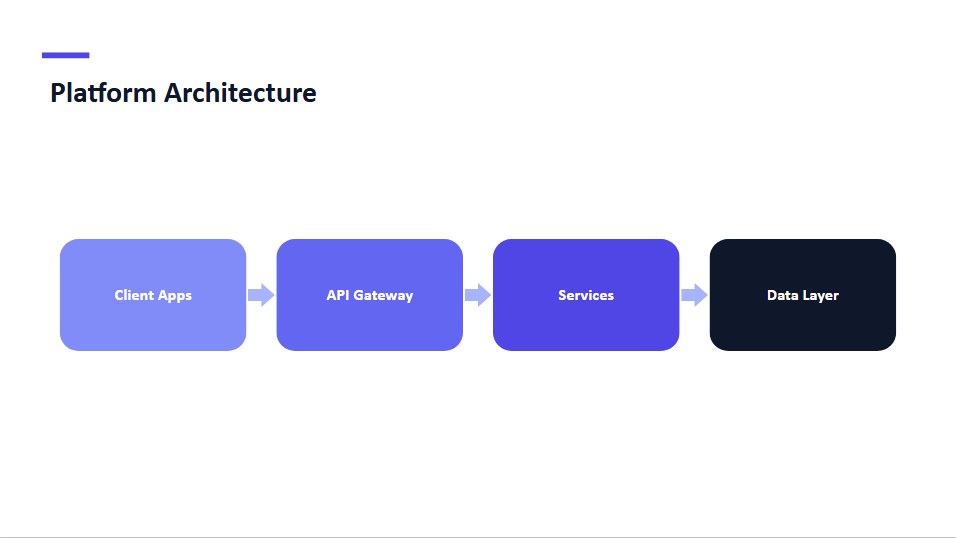
"connector" | ConnectorPptxElement | A straight, bent, or curved line linking shapes, with optional arrowheads. |
"image" | ImagePptxElement | A raster image from a <p:pic> node. |
"picture" | PicturePptxElement | Functionally identical to image, distinguished by discriminant for semantic clarity. |
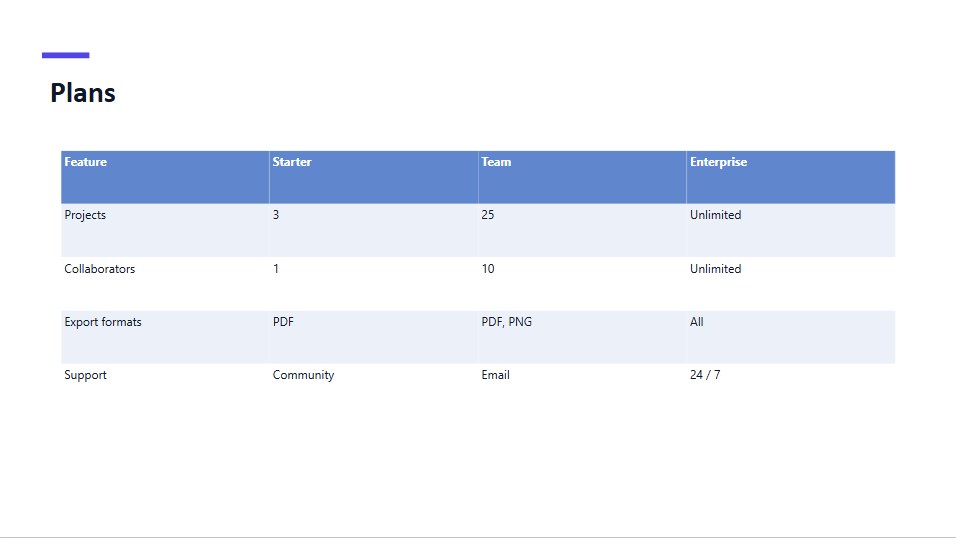
"table" | TablePptxElement | A table embedded via a <p:graphicFrame>; cells in tableData. |
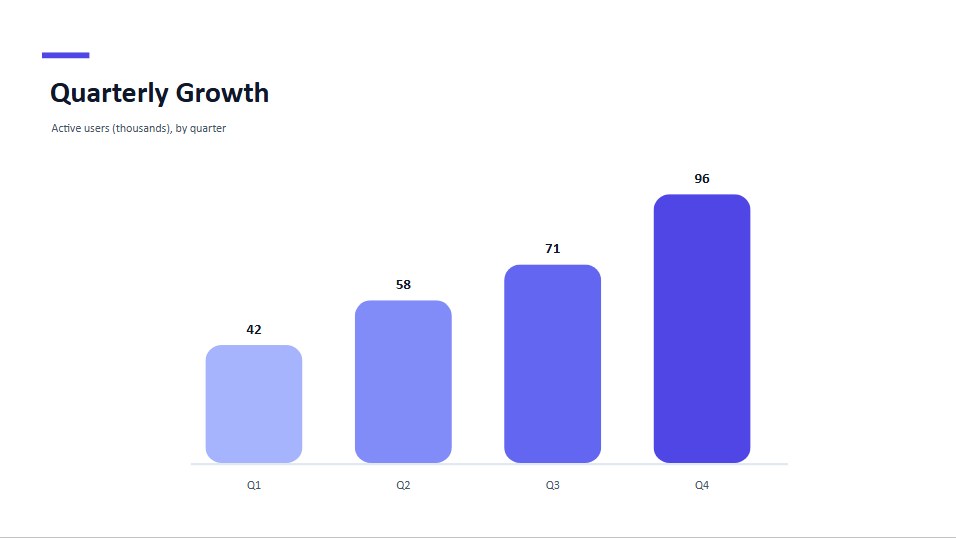
"chart" | ChartPptxElement | A chart embedded via a <p:graphicFrame>; data in chartData. |
"smartArt" | SmartArtPptxElement | A SmartArt diagram decomposed to positioned shapes; data in smartArtData. |
"ole" | OlePptxElement | An OLE object (embedded Excel/Word/PDF/Visio/MathType) with a preview image. |
"media" | MediaPptxElement | An audio or video element referencing a file in the archive. |
"group" | GroupPptxElement | A container whose children inherit the group's transform. |
"ink" | InkPptxElement | Freehand stylus/mouse strokes stored as SVG paths, with optional pressure. |
"contentPart" | ContentPartPptxElement | An mc:AlternateContent content part, typically modern pen/highlighter ink. |
"zoom" | ZoomPptxElement | A Slide Zoom or Section Zoom object that navigates to a target slide. |
"model3d" | Model3DPptxElement | A 3D model (.glb/.gltf) embedded via p16:model3D, with a poster image. |
"unknown" | UnknownPptxElement | An element the parser does not recognise; preserved for round-trip. |
Graphic-frame variants (table, chart, smartArt) also carry an extensionXml array of unrecognised a:graphicData/a:extLst extensions, preserved verbatim for round-trip.
A few of these element types as the engine renders them (charts as inline SVG, tables as HTML, shapes and connectors as SVG geometry):
Subset aliases
For function signatures that accept a subset, the core package exports helper aliases:
type PptxElementWithText = TextPptxElement | ShapePptxElement | ConnectorPptxElement;
type PptxImageLikeElement = ImagePptxElement | PicturePptxElement;
// plus PptxElementWithShapeStyle for everything carrying shapeStyle
Type guards
packages/core/src/core/types/type-guards.ts exports runtime guards so you can narrow without writing element.type === ... comparisons by hand:
| Guard | Narrows to |
|---|---|
isTextElement(el) | TextPptxElement |
isShapeElement(el) | ShapePptxElement |
isConnectorElement(el) | ConnectorPptxElement |
isImageLikeElement(el) | PptxImageLikeElement (image or picture) |
isInkElement(el) | InkPptxElement |
isZoomElement(el) | ZoomPptxElement |
hasTextProperties(el) | PptxElementWithText (can carry text) |
hasShapeProperties(el) | PptxElementWithShapeStyle (can carry a shape style) |
import { isImageLikeElement, hasTextProperties } from 'pptx-viewer-core';

for (const el of slide.elements) {
	if (isImageLikeElement(el)) console.log(el.imagePath);
	if (hasTextProperties(el)) console.log(el.text);
}
Units: EMU and pixels
PowerPoint's native coordinate system is the English Metric Unit (EMU):
| Constant | Value | Where |
|---|---|---|
EMU_PER_PX / EMU_PER_PIXEL | 9525 (at 96 DPI) | core/constants.ts and the SDK units module |
EMU_PER_INCH | 914400 | SDK units module |
EMU_PER_POINT | 12700 | SDK units module |
Element positions and sizes in the model are pixels, converted (and rounded) from EMU at parse time and converted back on save. The builder SDK also exports conversion helpers:
import {
	inches,
	cm,
	mm,
	pt, // to pixels
	emuToPixels,
	pixelsToEmu, // EMU <-> px
	inchesToEmu,
	cmToEmu, // to EMU (e.g. for slide dimensions)
	SlideSizes,
} from 'pptx-viewer-core';

inches(1); // => 96 (px)
pt(12); // => 16 (px)
pixelsToEmu(96); // => 914400
SlideSizes.WIDESCREEN_16_9; // => { width: 12192000, height: 6858000 } (EMU)
SlideSizes provides the standard deck dimensions in EMU: WIDESCREEN_16_9 (the modern default), STANDARD_4_3, WIDESCREEN_16_10, A4_LANDSCAPE, A4_PORTRAIT, LETTER_LANDSCAPE, and LETTER_PORTRAIT.
Slides, layouts, and masters
A presentation's styling is hierarchical. Each slide references a layout (via slide.layoutPath), each layout belongs to a master, and each master references a theme:
PptxSlide ── layoutPath ──> PptxSlideLayout ──> PptxSlideMaster ── themePath ──> PptxThemedata.slideMasters exposes this tree:
interface PptxSlideMaster {
	path: string; // e.g. "ppt/slideMasters/slideMaster1.xml"
	name?: string;
	themePath?: string; // theme this master references
	layoutPaths?: string[]; // layouts belonging to this master
	layouts?: PptxSlideLayout[]; // parsed layout objects
	elements?: PptxElement[]; // shapes drawn on the master itself
	placeholders?: Array<{ type: string; idx?: string }>;
	txStyles?: PptxMasterTextStyles; // title/body/other text defaults
	clrMap?: Record<string, string>; // scheme-colour alias map (bg1, tx1, ...)
	backgroundColor?: string;
	backgroundImage?: string;
}

interface PptxSlideLayout {
	path: string;
	name?: string;
	elements?: PptxElement[];
	placeholders?: Array<{ type: string; idx?: string }>;
	clrMapOverride?: Record<string, string>; // p:clrMapOvr
	backgroundColor?: string;
	backgroundImage?: string;
}
When a slide element leaves a property unspecified, the engine resolves it up the chain: element, then the matching placeholder on the layout, then the master, then the theme. themeColorMap on PptxData is the already-resolved scheme-colour lookup for the default master. The resolution rules are described in Architecture.
Iterating and narrowing
import { PptxHandler } from 'pptx-viewer-core';
import type { PptxElement } from 'pptx-viewer-core';

const handler = new PptxHandler();
const data = await handler.load(buffer);

function summarize(elements: PptxElement[]) {
	for (const element of elements) {
		switch (element.type) {
			case 'text':
				console.log('text:', element.text);
				break;
			case 'image':
			case 'picture':
				console.log('image:', element.imagePath);
				break;
			case 'table':
				console.log('table rows:', element.tableData?.rows.length ?? 0);
				break;
			case 'chart':
				console.log('chart:', element.chartData?.chartType);
				break;
			case 'group':
				summarize(element.children); // recurse into the group
				break;
			default:
				console.log('element:', element.type);
		}
	}
}

for (const slide of data.slides) {
	summarize(slide.elements);
}
Related reading
- Architecture - how the engine is structured and how theme resolution works.
- Core package overview - handler, builder, and converter APIs.
- OpenXML conformance - Strict vs Transitional round-trip.