Vue Viewer Overview
pptx-vue-viewer is a Vue 3 component for rendering and editing .pptx files. It is built on pptx-viewer-core and includes the toolbar, inspector panels, slide canvas, animation engine, presentation mode, real-time collaboration, and export. It is a <script setup> port of the React viewer, sharing the same underlying architecture and the same PowerPointViewerAPI contract.
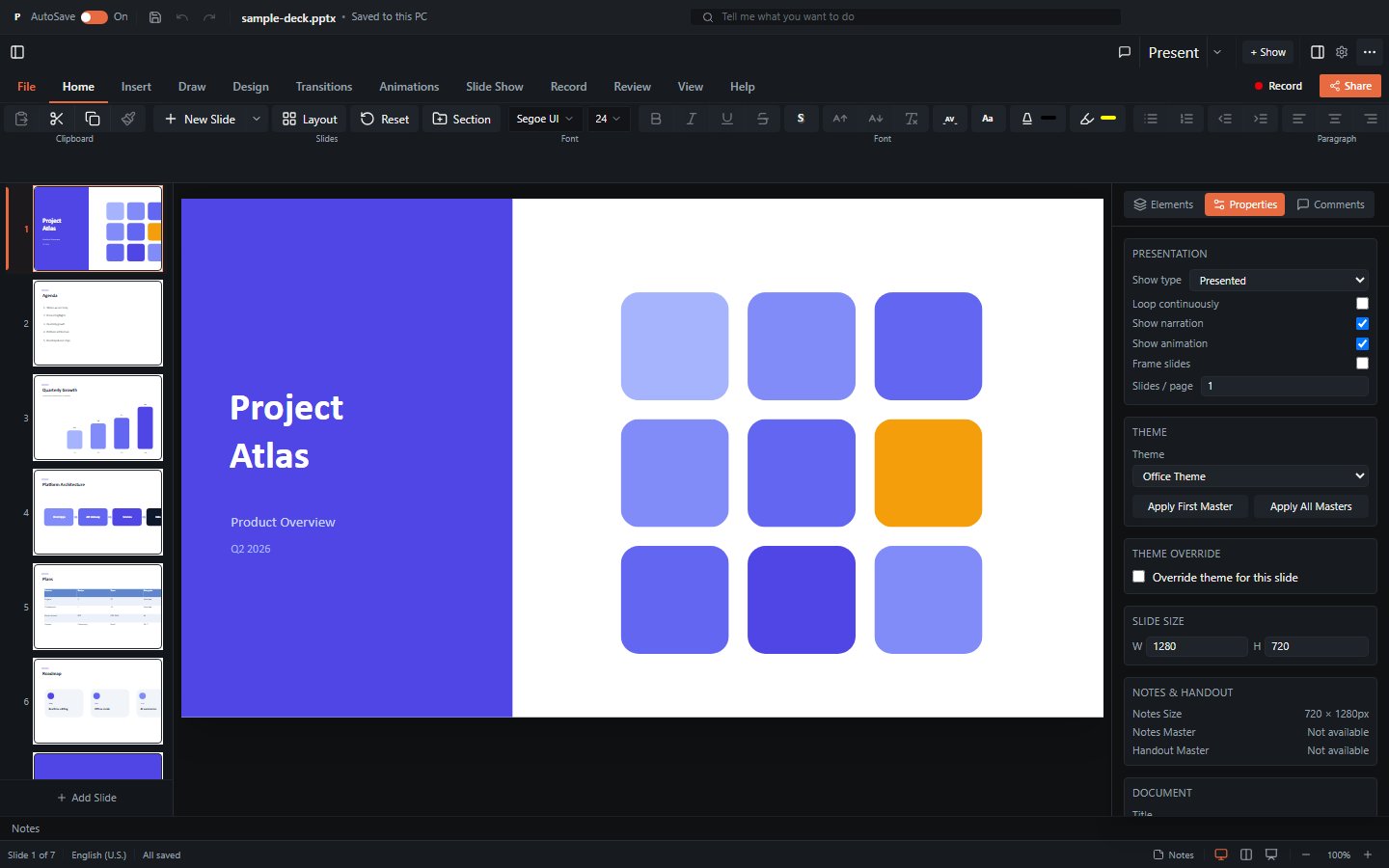
What it provides
| Capability | Summary |
|---|---|
| Viewer | Renders slides with 16 element types (shapes, text, images, tables, 23 chart types, SmartArt, connectors, media, ink, OLE, 3D models, zoom). |
| WYSIWYG editor | Insert / move / resize / delete elements, inline text editing, style editing, slide management, gated behind canEdit. |
| Presenter | Fullscreen slideshow with animations, transitions, speaker notes, presenter view with timer. |
| Export | PNG / SVG / PDF / GIF / video / JSON slide export, plus save-as PPTX. See Export. |
| Collaboration | Real-time multi-user editing via Yjs CRDT with presence tracking and remote cursors. See Collaboration. |
Element coverage
For a precise list of what the underlying parser/serializer supports, and what is approximated, see Limitations.
Installation
npm i pptx-vue-viewerThe core engine (pptx-viewer-core) is bundled in, so you don't install it separately; add it only if you also want to use the framework-agnostic engine directly.
Peer dependencies (you provide these in your app):
vue^3.5vue-i18n^11jszip,fast-xml-parser
Optional dependencies (only needed for specific features):
three- GLB/GLTF 3D models and 3D surface chartsyjs,y-websocket- real-time collaboration (relay transport)y-webrtc- serverless peer-to-peer collaboration
TIP
3D and collaboration features degrade gracefully. Without three, 3D models fall back to their poster image. Without yjs/y-websocket, the viewer runs in single-user mode.
Import paths
The package exposes several entry points (from package.json exports):
// Root entry - viewer, theme utilities, i18n helper re-exports
import { PowerPointViewer } from 'pptx-vue-viewer';

// Viewer sub-entry - the component plus renderers and the curated composables
import { PowerPointViewer } from 'pptx-vue-viewer/viewer';

// vue-i18n dictionary (single-brace interpolation, converted from the shared dictionary)
import { translationsEn } from 'pptx-vue-viewer/i18n';

// Bundled stylesheet, for apps that don't already use Tailwind CSS v4
import 'pptx-vue-viewer/styles';
Both . and ./viewer export PowerPointViewer; ./viewer additionally exposes the renderer components and a curated set of composables (see Composables). Use the root entry for the common case.
Rendering philosophy: CSS, not Canvas
Slides are rendered with CSS positioning and transforms (scaled HTML/SVG), not an HTML Canvas. This provides:
- Crisp text at any zoom level
- Native browser text selection and accessibility
- DOM-based interaction (click, drag, resize hit-testing)
- Standard CSS effects (shadows, gradients, borders)
The tradeoff is that some visual effects are approximated (backdrop-filter, mix-blend-mode, CSS 3D, path gradients). Raster export goes through html2canvas-pro, which has its own constraints. The full list lives in Limitations.
Composables-based architecture
PowerPointViewer.vue is a thin <script setup> orchestrator. Its logic is decomposed into 70+ custom composables under viewer/composables/, composed inside the component; the visual components (.vue SFCs) are largely presentational. Conventions differ from React by design:
forwardRefhandle ->defineExpose(see Imperative Handle)- function-prop callbacks -> emits (see Props)
- React context -> Vue
provide/inject(theme, table-cell editing, SmartArt node editing, etc.)
Most composables are internal architecture, but a curated subset is re-exported from pptx-vue-viewer/viewer. See Composables for which are public API.
Key exports
| Export | Kind | Purpose |
|---|---|---|
PowerPointViewer | component | The main viewer/editor component. |
PowerPointViewerProps | type | Props interface. See Props. |
PowerPointViewerEmits | type | Emitted events. See Props. |
PowerPointViewerExpose | type | defineExpose API surface. See Handle. |
ViewerTheme, ViewerThemeColors | type | Theme configuration types. See Theming. |
defaultThemeColors, defaultRadius | const | Built-in dark-theme defaults. |
vermilionLightTheme, vermilionDarkTheme | const | Built-in vermilion light/dark presets. |
themeToCssVars, defaultCssVars | function | Convert a theme to --pptx-* CSS vars. |
provideViewerTheme, useViewerTheme | function | Advanced theme provide/inject. |
translationsEn | const | vue-i18n message dictionary (from pptx-vue-viewer/i18n). |
Next steps
- Getting Started - a minimal working example.
- Component Props - the complete
PowerPointViewerPropsreference. - Imperative Handle - the
defineExposeAPI. - Theming - colours, radius, CSS vars, provide/inject.
- Composables - architecture and the public composable surface.
- Export - PNG/PDF/SVG/GIF/video and the html2canvas-pro pipeline.
- Collaboration - Yjs co-editing and presence.