
Getting started
Abiotic Editor gives you a workbench for your Abiotic Factor saves. It can run in a web browser or as a desktop app. Both let you inspect a save, make changes, and review them before you commit anything.
First rule: secure the specimen
- Close Abiotic Factor, or stop the dedicated server.
- Copy your whole world folder somewhere safe. Give the copy a name such as
Cascade before edits. - Open the browser editor or install the desktop app.
- Load your saves, make one small change, then choose SAVE.
- In a browser session that offers EXPORT, choose EXPORT after saving, then copy the exported files into the matching game save folder.
- Start the game and check that the change is where you expected it.
The editor places a .bak copy beside every file it writes. That is useful for an immediate undo, but it is one rolling backup. Keep your own full-world copy for real experiments.
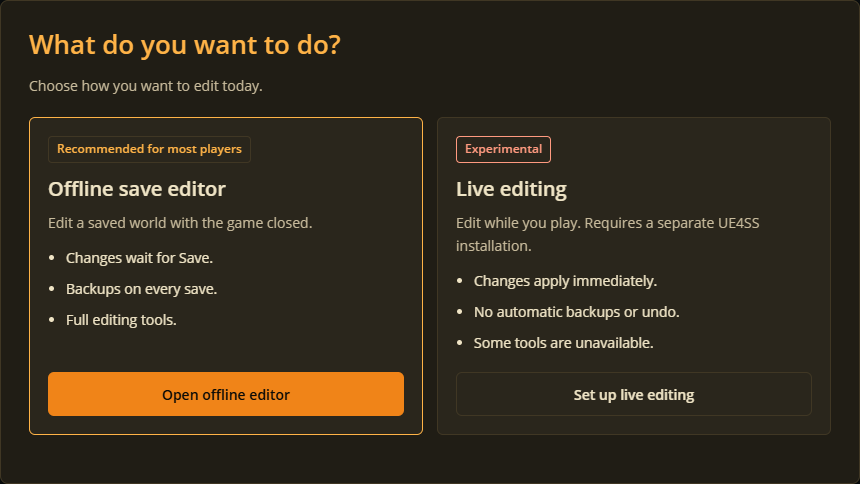
Choose Open offline editor to work on save files.
Choose your tool
The browser editor is quick and needs no installation. The desktop app finds local saves, has more tools, and is needed for jobs such as transfers, Game Pass saves, and live editing.
Download the desktop app
Get the latest version from GitHub Releases or the Nexus Mods downloads page.
| Download | Use it when... |
|---|---|
AbioticEditor-desktop-win-x64-...zip | You play on Windows. Extract it and run AbioticEditor.Web.exe. |
AbioticEditor-desktop-linux-x64-...zip | You play on Linux or Steam Deck. Extract it, then open launch-linux.desktop and choose Trust and Launch. |
AbioticEditor-cli-...zip | You already use command-line tools or run a server. Most players can skip this. |
No .NET install is needed for the desktop packages.
Windows first-run warning
This free fan tool is not code-signed, so Windows may call it an unknown publisher on its first launch. Check that the zip came from this project's Releases or Nexus page. If Windows blocks the zip, right-click it, choose Properties, tick Unblock, choose OK, then extract it. If SmartScreen appears, choose More info, then Run anyway only after checking the download source.
Find your saves
You usually do not need to hunt for files: the desktop app looks for them. If it needs a hand, open the folder for the world you want to edit.
On Windows, open File Explorer and paste %LOCALAPPDATA%\AbioticFactor\Saved\SaveGames into its address bar, then press Enter. Open your numbered account folder, then Worlds to find your world folders.
| Where you play | Usual save location |
|---|---|
| Windows client | %LOCALAPPDATA%\AbioticFactor\Saved\SaveGames\<your SteamID>\Worlds\<WorldName> |
| Linux or Steam Deck (Proton) | <Steam library>\steamapps\compatdata\427410\pfx\drive_c\users\steamuser\AppData\Local\AbioticFactor\Saved\SaveGames\<your SteamID>\Worlds\<WorldName> |
| Dedicated server | The folder that contains Worlds\<WorldName> |
For character appearance editing, choose the account folder one level above Worlds, if you can. It contains your worlds and the saved appearance presets together. The browser guide shows exactly what that folder looks like.
Your next job
- Want a visual tour of player, world, and server tools? Read Desktop app.
- Want to work in Chrome, Edge, Firefox, or Safari? Read Edit in your browser.
- Want to shift loot between saves? Read Transfer items.
- Something misbehaved? The desktop guide explains how to send a useful report.
The command-line tool and technical reference are there for people who enjoy the machinery. You do not need either for ordinary save editing.